Building terminal apps from Scratch
Not every terminal app needs a TUI framework. Frameworks like Bubbletea or OpenTUI are powerful, but often overkill for rendering a simple list or tracking basic state.
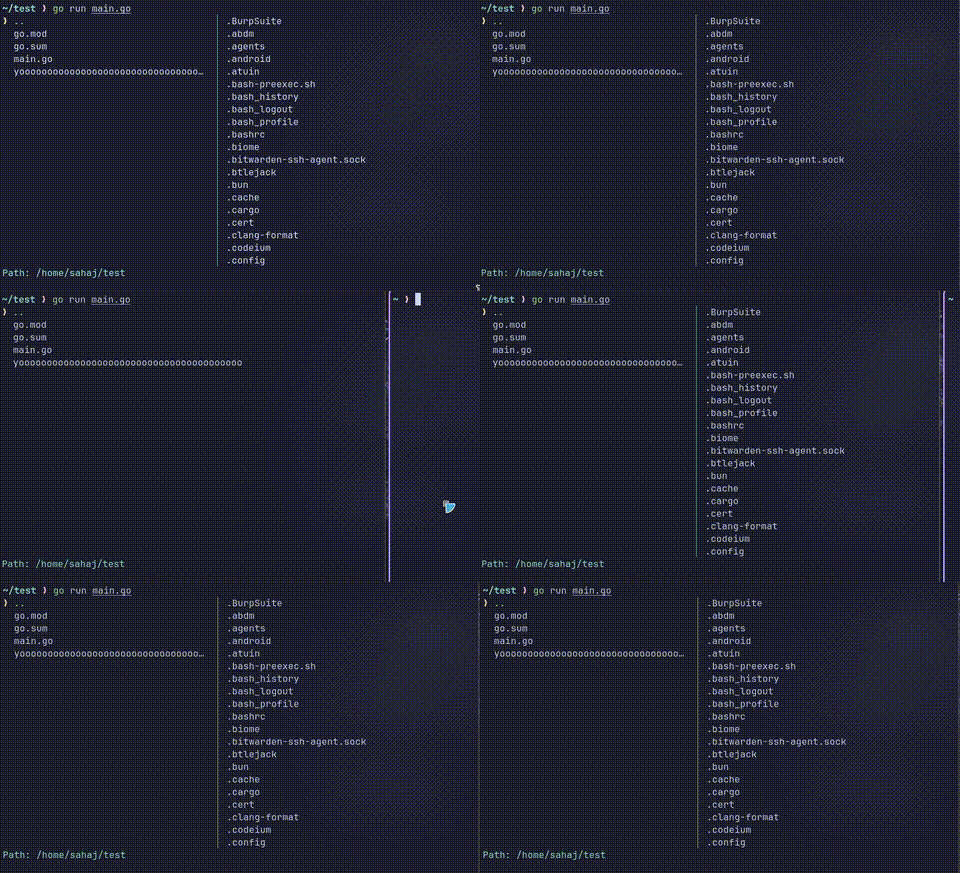
In this guide, we're going raw. We're gonna understand the basics, hijack the terminal, capture user input, see rendering methods, and build a dual-panel file browser from scratch.
-
CLI (One-Shot): It computes data, dumps it to the screen with some pretty colors, and instantly exits. It's not interactive.
Example:ls,git status, etc. -
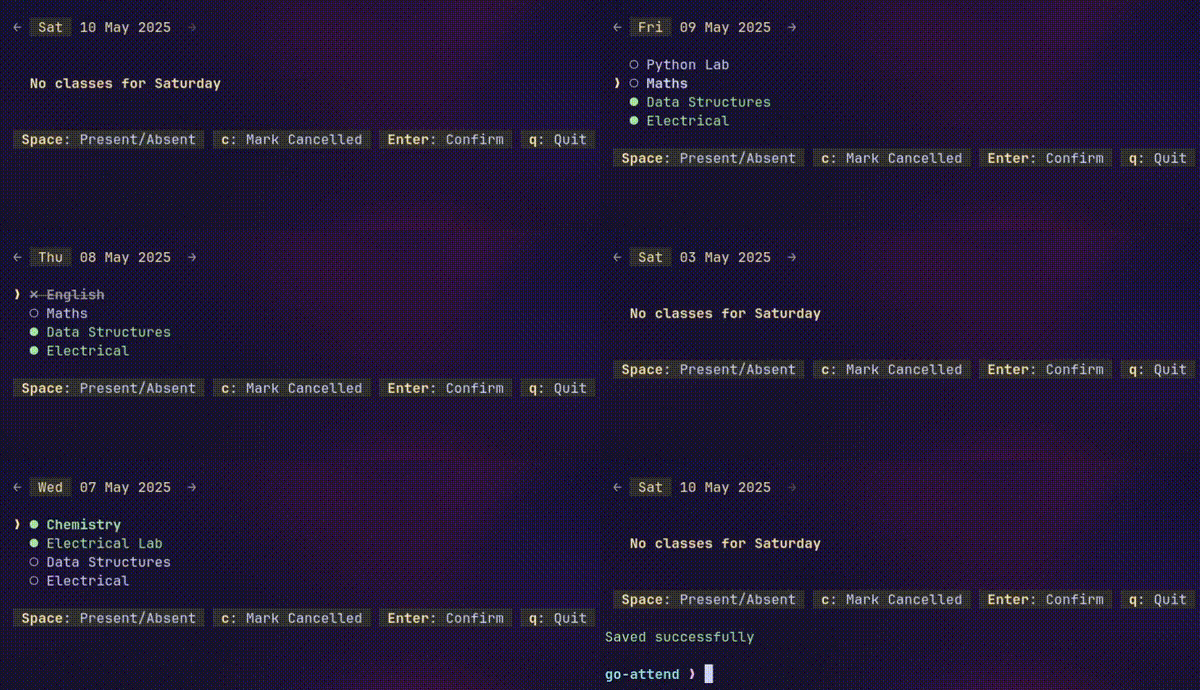
Input-Driven TUI: Only re-renders/updates when the user presses a key.
Example: sahaj-b/go-attend
-
Concurrent TUI: Has an independent render/event loop while simultaneously listening for input on a separate thread. Used when you don't want to wait for input to update the UI (eg: loading spinners, live monitors, resize events).
Example: sahaj-b/sound-of-sort,
fzf,htop, etc.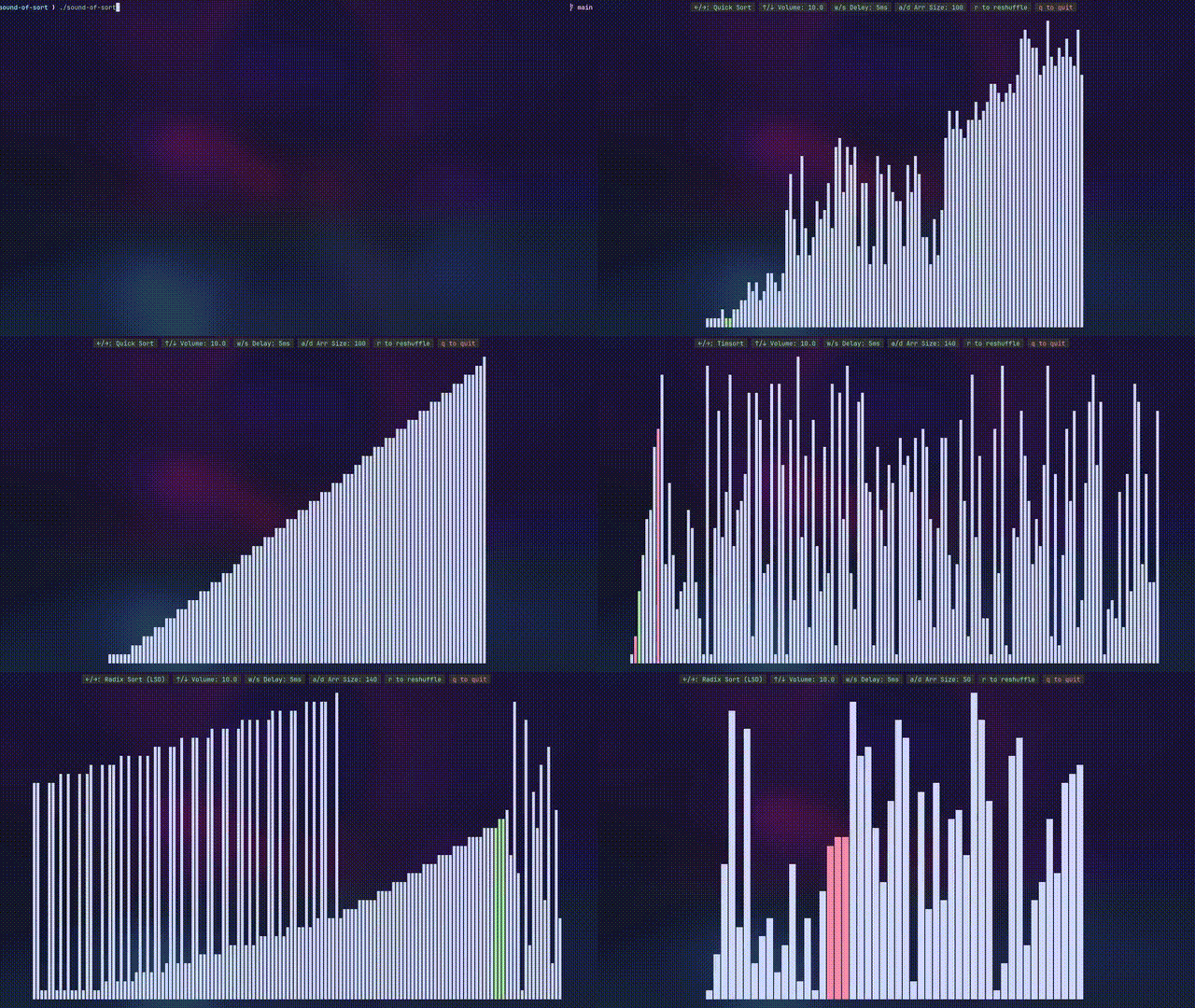
These are the raw commands you send to the terminal to control cursor movement, colors, and screen clearing.
They start with the ESC character (\x1b or \033)
Examples:
\033[?25h/\033[?25l: Show/Hide cursor\033[2J: Clear screen\033[s/\033[u: Save/Restore cursor position.\033[J: Clear everything below the cursor.\033[%dA: Move cursor UP by%dlines.\033[Y;XH: Move cursor to (X,Y) coordinates.\033[?7h/\033[?7l: Enable/Disable line wrapping
Etc...
There are a many ways to handle ANSI colors in code (structs, wrapper functions, method chaining, etc) But the simplest, most frictionless way is just declaring them as string variables:
yellow := "\033[33m"
bggray := "\033[100m"
reset := "\033[0m"
fmt.Println(yellow + bggray + "hello" + reset)Be a good citizen and respect the NO_COLOR environment variable. If os.Getenv("NO_COLOR") != "" is true, just set all your color variables to an empty string "". This instantly strips all color formatting
By default, your terminal is in "cooked" (canonical) mode.
In this mode, when you type anything, it does NOT write to stdin(standard input) until you press Enter (it buffers input).
In TUIs, we want to react to every keystroke immediately, without waiting for Enter. So we need to switch the terminal to "raw" mode.
It disables input buffering, echoing input, and line editing features. You get direct access to every key press as it happens.
In raw mode, \n only moves the cursor down, not to the start of the next line. Use \r\n for a proper newline.
When you update the screen, you have two core philosophies. If you want the user to still see their previous terminal history (like go-attend, fzf --height 40%, Claude Code), you use Inline Rendering. If you want a full immersive app(like sound-of-sort, htop, fzf) that takes over the terminal, you use Fullscreen Rendering.
Instead of clearing the whole screen, you only clear the lines your app is actively using. To do this, we can count how many lines we printed in the last frame(count \r\n), and on the next frame, move the cursor up by that many lines(using \033[%dA), clear down (\033[J), and redraw.
We can also use the Save & Restore method (\033[s and \033[u) to jump back to a
specific cursor position, but it has a fatal flaw.
When the terminal scrolls (either manually by user, or because your output exceeds the
terminal height), the remembered coordinates doesn't move up with the text.
So when you restore, you end up drawing out of bounds, screwing up the UI.
Note: Inline rendering is extremely sensitive to line-wrapping and terminal scrolling. We'll see that in the Responsiveness section below.
This is basically clearing the entire screen everytime before you draw. And, if you dont want to mess with the user's terminal history (scrollback), you can use the Alternate Screen Buffer (recommended).
Activate it using \033[?1049h. This completely separates your app from the user's history. When you exit, you send \033[?1049l to return them exactly where they were. This is what most TUIs like vim, htop, opencode do.
You still clear the screen, but it happens in this isolated buffer.
There's also Differential Rendering (Double Buffer), which is what frameworks like Bubbletea and OpenTUI use. Instead of redrawing the entire screen, it compares the Current Frame and the Next Frame.
It then generates exactly the right cursor movements (\033[Y;XH) and ANSI codes to update only the specific characters that changed. It can be both inline or fullscreen. It's like React's Virtual DOM diffing, but for terminal cells.
- Pros: Absolute maximum performance and no flickering. It sends the minimum number of bytes to
stdout. - Cons: Complex to implement from scratch, overkill for simple apps
Terminal UIs are responsive too, just in a more cursed way than the web.
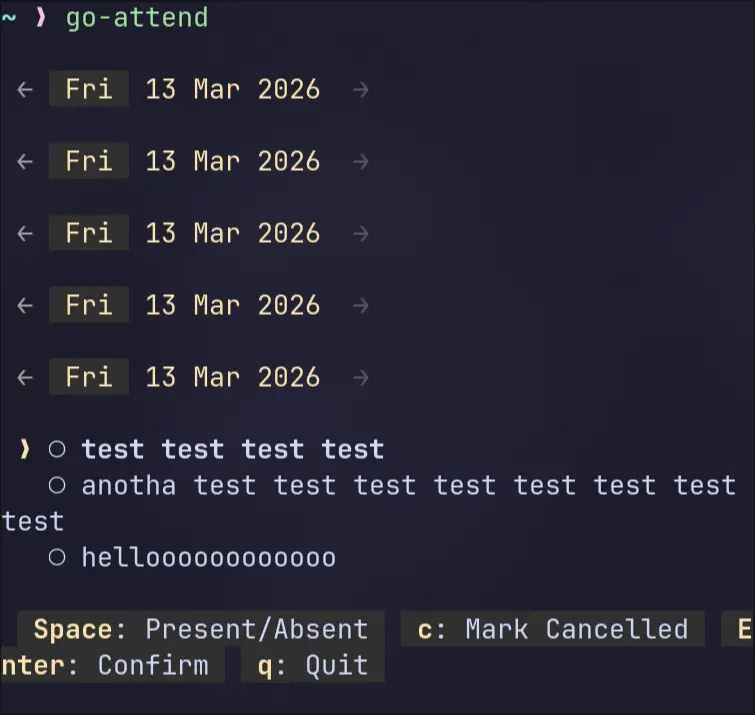
When a line exceeds the terminal width, the terminal automatically wraps it to the next line. This is a problem because your app thinks it's printed one line, but visually it takes up two lines.
If you are using Inline Rendering, this will screw up the rendering. You don't know if the lines got wrapped, so when you move the cursor up to redraw, you might be moving up too few lines, resulting in a shredded, duplicate UI.
The Fix: Clamp your strings' visible length to the terminal width before drawing (recommended), or implement wrap detection logic
len(str) won't give you the visible length if you have ANSI codes or multi-byte unicode chars in your string. Use github.com/acarl005/stripansi with RuneCount like this:
func visibleLen(s string) int {
  return utf8.RuneCountInString(stripansi.Strip(s))
}
If you are using multi-width unicode characters (eg: CJK), use github.com/mattn/go-runewidth instead of RuneCount
Why aren't we using the ANSI code(\033[?7l) to disable line wrapping instead?
Because it behaves differently: once the text reaches the end of a line, any extra characters will replace the last character, which makes the end of that line look funky.
If your app tries to print more lines than the terminal has height, the terminal will physically scroll down to make room.
Now, when you move the cursor up to redraw, it will stop at the top of the terminal, not the top of your app. So you end up with a shredded UI and a messed up scrollback history.
The Fix: Clamp your output's total height to the terminal height. If you have UI chrome like a status bar, that needs to count too.
If the user resizes the terminal, your app needs to adapt immediately. In Unix-like systems, the terminal sends a SIGWINCH signal on resize.
Listen for SIGWINCH, then re-read terminal size, recompute panel widths/heights, and redraw immediately.
If you care about Windows too, use other methods like polling terminal size, using a library, or using platform-specific syscalls.
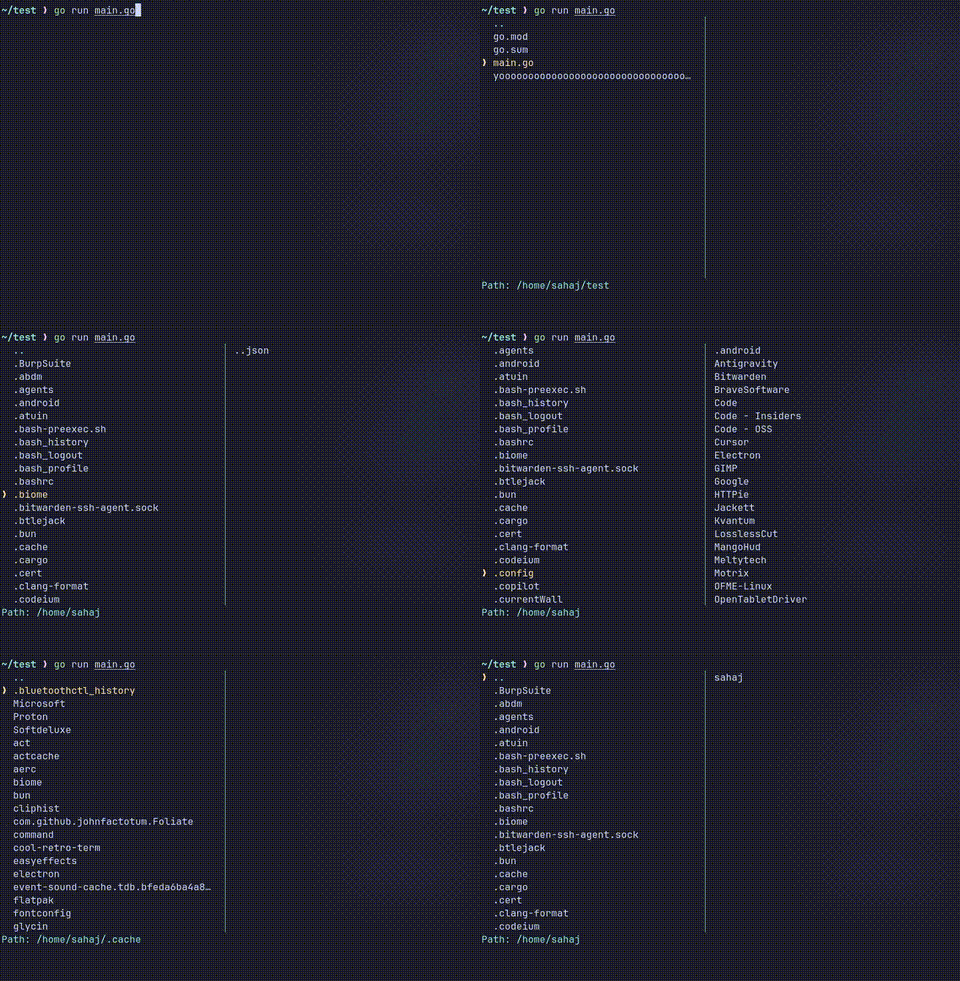
Enough theory, we'll now make a simple dual-panel, inline-rendered file browser that shows the contents of the current directory on the left, and the contents of the selected directory on the right.
We'll use Go's cross-platform term library (golang.org/x/term) for terminal manipulation (setting to raw mode and getting terminal size).
We can absolutely do it manually with stty commands on Unix-like systems, for e.g. see go-attend's initScreen function for manual raw mode setup. But using the library is just simpler and portable.
We'll switch to raw mode and hide the cursor
import (
    "os"
    "golang.org/x/term"
)

func initUI() (func(), error) {
    // save current state of the terminal, and switch to raw mode
    oldState, err := term.MakeRaw(int(os.Stdin.Fd()))
    if err != nil {
        return nil, err
    }

    fmt.Print("\033[?25l") // hide cursor

    // return a cleanup function to run on exit
    return func() {
        term.Restore(int(os.Stdin.Fd()), oldState) // restore the old terminal state
        fmt.Print("\033[?25h") // show cursor
    }, nil
}Holds the app's state, and has methods (receiver functions) for rendering, updating, etc.
type App struct {
    currentDir        string
    entries           []os.DirEntry
    cursorIdx         int // position of selected entry
    scrollOffset      int // for scrollling entries
    rightPaneEntries  []os.DirEntry
    width             int // app's current width
    height            int // app's current height
    lastRenderedLines int // track lines to move cursor UP
    showRightPane     bool
}We'll use strings.Builder to efficiently construct frames, as it avoids repeated string copying inside loops, unlike +=, which creates new strings each time. For small, infrequent concatenations, plain + is fine though.
At the very start, we move the cursor up by lastRenderedLines and clear down.
const (
    maxHeight = 20
    maxWidth  = 80
    yellow    = "\033[33m"
    cyan      = "\033[36m"
    reset     = "\033[0m"
)

func (a *App) render() {
    var b strings.Builder

    // 1. move cursor UP by last frame's height, then clear down
    if a.lastRenderedLines > 0 {
        b.WriteString(fmt.Sprintf("\033[%dA\033[J", a.lastRenderedLines))
    }

    linesPrinted := 0
    panelWidth := a.width
    if a.showRightPane {
        panelWidth /= 2
    }

    bodyHeight := max(a.height-1, 0) // max entries to show at once

    // 2. draw rows
    for i := range bodyHeight {
        idx := a.scrollOffset + i
        leftStr, rightStr := "", ""
        if idx < len(a.entries) {
            leftStr = entryLabel(a.entries[idx], idx == a.cursorIdx) // get formatted entry string
        }

        row := clamp(leftStr, a.width)
        if a.showRightPane {
            if i < len(a.rightPaneEntries) {
                rightStr = a.rightPaneEntries[i].Name()
            }
            safeLeft := clamp(leftStr, panelWidth-3)
            safeRight := clamp(rightStr, panelWidth-3)
            // compute padding from visible width
            padding := max(panelWidth-3-visibleLen(safeLeft), 1)
            row = clamp(fmt.Sprintf("%s%s %s│%s %s", safeLeft, strings.Repeat(" ", padding), cyan, reset, safeRight), a.width)
        }

        b.WriteString(row + "\r\n")
        linesPrinted++
    }

    // 3. status bar
    statusBar := fmt.Sprintf("\033[36mPath: %s\033[0m", a.currentDir)
    b.WriteString(clamp(statusBar, a.width) + "\r\n")
    linesPrinted++

    a.lastRenderedLines = linesPrinted
    fmt.Print(b.String())
}

func (a *App) updateLayout() { // set layout based on current terminal size
    termwidth, termheight, _ := term.GetSize(int(os.Stdin.Fd()))
    // clamp width to terminal width to avoid line wrapping
    a.width = min(termwidth, maxWidth)
    a.height = min(termheight-1, maxHeight)
    a.height = max(a.height, 1)
    a.showRightPane = termwidth >= 80
}In raw mode, arrow keys are escape sequences (Up is \033[A). Because we are building an input-driven app, our event loop is dead simple: draw the screen, block until the user presses a key, update state, and repeat.
func (a *App) readKey() string {
    buf := make([]byte, 3) // 3 bytes coz arrow keys are 3 bytes.
    n, _ := os.Stdin.Read(buf)
    return string(buf[:n])
}

func (a *App) handleKey(key string) bool {
    switch key {
    case "q", "\x03": // \x03 : Ctrl+C
        return false // exit
    case "\033[A", "k": // \033[A : Up Arrow
        a.moveCursor(-1)
    case "\033[B", "j": // \033[B : Down Arrow
        a.moveCursor(1)
    case "\r", "\n": // Enter
        a.enterDirectory()
    }
    return true // continue
}

func main() {
    restore, err := initUI()
    if err != nil {
        panic(err)
    }
    defer restore() // restore terminal state on exit

    app := loadApp(".") // this will return an *App with `entries` populated with current dir
    app.updateLayout()

    // redraw -> wait for input -> update state -> redraw -> ...
    for {
        app.render()

        key := app.readKey()
        if !app.handleKey(key) {
            break
        }
    }
}Bulletproofing against Pipes (/dev/tty vs os.Stdin)
When you pipe data into your app (e.g. cat data.txt | yourapp), os.Stdin becomes the pipe, not the user's terminal. If you try to set raw mode on a pipe, it will fail and crash your app.
The Fix: Use /dev/tty instead. It's a magical Unix file that always points to the actual screen and keyboard, bypassing standard input entirely. This is how tools like fzf can read piped data while still letting you type and navigate.
tty, _ := os.OpenFile("/dev/tty", os.O_RDWR, 0)
// now replace all `os.Stdin` with `tty`
term.MakeRaw(int(tty.Fd()))
// ...
term.GetSize(int(tty.Fd()))
// To read from pipe, use `os.Stdin.Read()`, to read keyboard input, use `tty.Read()`
No one is piping data into our file browser, so we can get away with os.Stdin for simplicity.
Here is the complete, runnable code for the inline-rendered file browser without SIGWINCH handling. To run it, copy it into a main.go file, run go mod init tui, go mod tidy (to fetch x/term and stripansi), and run it.
(This is not production code. Error handling, edge cases, and NO_COLOR are ignored for brevity)
package main

import (
    "fmt"
    "os"
    "path/filepath"
    "strings"
    "unicode/utf8"

    "github.com/acarl005/stripansi"
    "golang.org/x/term"
)

const (
    maxHeight = 20
    maxWidth  = 80
    yellow    = "\033[33m"
    cyan      = "\033[36m"
    reset     = "\033[0m"
)

type App struct {
    currentDir        string
    entries           []os.DirEntry
    cursorIdx         int
    scrollOffset      int
    rightPaneEntries  []os.DirEntry
    width             int
    height            int
    lastRenderedLines int
    showRightPane     bool
}

func initUI() (func(), error) {
    oldState, err := term.MakeRaw(int(os.Stdin.Fd())) // switch to raw mode
    if err != nil {
        return nil, err
    }
    fmt.Print("\033[?25l") // hide cursor
    return func() {
        term.Restore(int(os.Stdin.Fd()), oldState)
        fmt.Print("\033[?25h") // show cursor
    }, nil
}

func visibleLen(s string) int {
    return utf8.RuneCountInString(stripansi.Strip(s))
}

func readEntries(dir string) []os.DirEntry {
    files, _ := os.ReadDir(dir)
    // extra nil first row, representing the parent directory ('..')
    return append([]os.DirEntry{nil}, files...)
}

func loadApp(dir string) *App {
    absPath, _ := filepath.Abs(dir)
    app := &App{
        currentDir: absPath,
        entries:    readEntries(absPath),
    }
    app.updateRightPanel()
    return app
}

func (a *App) updateRightPanel() {
    if len(a.entries) == 0 {
        a.rightPaneEntries = nil
        return
    }

    selected := a.entries[a.cursorIdx]
    // only directories can be previewed
    if selected != nil && !selected.IsDir() {
        a.rightPaneEntries = nil
        return
    }

    dir := filepath.Join(a.currentDir, "..")
    if selected != nil {
        dir = filepath.Join(a.currentDir, selected.Name())
    }
    a.rightPaneEntries, _ = os.ReadDir(dir)
}

func (a *App) updateScroll() {
    bodyHeight := max(a.height-1, 1)
    if a.cursorIdx < a.scrollOffset {
        a.scrollOffset = a.cursorIdx
    }
    if a.cursorIdx >= a.scrollOffset+bodyHeight {
        a.scrollOffset = a.cursorIdx - bodyHeight + 1
    }
}

func (a *App) enterDirectory() {
    if len(a.entries) == 0 {
        return
    }

    selected := a.entries[a.cursorIdx]
    if selected != nil && !selected.IsDir() {
        return
    }

    if selected == nil {
        a.currentDir = filepath.Join(a.currentDir, "..")
    } else {
        a.currentDir = filepath.Join(a.currentDir, selected.Name())
    }
    a.entries = readEntries(a.currentDir)
    a.cursorIdx, a.scrollOffset = 0, 0
    a.updateRightPanel()
}

func (a *App) updateLayout() {
    termwidth, termheight, _ := term.GetSize(int(os.Stdin.Fd()))
    // clamp width to terminal width to avoid line wrapping
    a.width = min(termwidth, maxWidth)
    a.height = min(termheight-1, maxHeight)
    a.height = max(a.height, 1)
    a.showRightPane = termwidth >= 80
}

func clamp(s string, maxLen int) string {
    width := visibleLen(s)
    if width > maxLen {
        if maxLen > 3 {
            // ANSI codes are kept in the string, so trim runes after measuring visible width.
            runes := []rune(s)
            return string(runes[:maxLen-2]) + "…"
        }
        return string([]rune(s)[:maxLen])
    }
    return s
}

func entryLabel(entry os.DirEntry, selected bool) string {
    prefix := "  "
    if selected {
        prefix = yellow + "❯ "
    }
    if entry == nil {
        return prefix + cyan + ".." + reset
    }
    return prefix + entry.Name() + reset
}

func (a *App) render() {
    var b strings.Builder

    if a.lastRenderedLines > 0 {
        // go UP and clear down to erase previous render
        b.WriteString(fmt.Sprintf("\033[%dA\033[J", a.lastRenderedLines))
    }

    linesPrinted := 0
    panelWidth := a.width
    if a.showRightPane {
        panelWidth /= 2
    }
    bodyHeight := max(a.height-1, 0)

    for i := range bodyHeight {
        idx := a.scrollOffset + i
        leftStr, rightStr := "", ""
        if idx < len(a.entries) {
            leftStr = entryLabel(a.entries[idx], idx == a.cursorIdx)
        }

        row := clamp(leftStr, a.width)
        if a.showRightPane {
            if i < len(a.rightPaneEntries) {
                rightStr = a.rightPaneEntries[i].Name()
            }
            safeLeft := clamp(leftStr, panelWidth-3)
            safeRight := clamp(rightStr, panelWidth-3)
            // compute padding from visible width
            padding := max(panelWidth-3-visibleLen(safeLeft), 1)
            row = clamp(fmt.Sprintf("%s%s %s│%s %s", safeLeft, strings.Repeat(" ", padding), cyan, reset, safeRight), a.width)
        }

        b.WriteString(row + "\r\n")
        linesPrinted++
    }

    statusBar := fmt.Sprintf("\033[36mPath: %s\033[0m", a.currentDir)
    b.WriteString(clamp(statusBar, a.width) + "\r\n")
    linesPrinted++

    a.lastRenderedLines = linesPrinted
    fmt.Print(b.String())
}

func (a *App) moveCursor(delta int) {
    if len(a.entries) == 0 {
        return
    }
    a.cursorIdx = max(0, min(a.cursorIdx+delta, len(a.entries)-1))
    a.updateScroll()
    a.updateRightPanel()
}

func (a *App) readKey() string {
    buf := make([]byte, 3)
    n, _ := os.Stdin.Read(buf)
    return string(buf[:n])
}

func (a *App) handleKey(key string) bool {
    switch key {
    case "q", "\x03":
        return false // exit
    case "\033[A", "k":
        a.moveCursor(-1)
    case "\033[B", "j":
        a.moveCursor(1)
    case "\r", "\n":
        a.enterDirectory()
    }
    return true // continue
}

func main() {
    restore, err := initUI()
    if err != nil {
        panic(err)
    }
    defer restore()

    app := loadApp(".")
    app.updateLayout()

    // main loop
    for {
        app.render()
        key := app.readKey() // wait for input
        if !app.handleKey(key) {
            break
        }
    }
}
If we want to handle terminal resizes (SIGWINCH Handling), we have to move away from this input-driven model, as external resize events can come in at any time. We will see how to handle resize in the next section.
To make your TUI testable, inject an io.Writer interface into your App struct.
type App struct {
    // ... other fields ...
    Out io.Writer
}

func (a *App) render() {
    // ... build string ...
    fmt.Fprint(a.Out, b.String()) // write to the injected destination
}
In tests, you can pass a bytes.Buffer to capture the output and assert against it, instead of writing directly to os.Stdout.
When you don't want to wait for user input, like for a live system monitor, animation, game, or reacting to external events like resize, you need concurrency. You can't just block on os.Stdin.Read() anymore.
There are many architectures to handle this. The two most common ones in Go are:
Instead of different parts of your app changing the state all at once (which causes data races), you funnel events into the main loop using channels and process them sequentially.
Concurrent Events -> Sequential Event Loop
keyChan := make(chan string)
tickChan := make(chan time.Time)

// input reading thread
go func() {
    for { keyChan <- app.readKey() }
}()

// animation ticker thread
go func() {
    for t := range time.Tick(time.Second / 60) { // 60 FPS
        tickChan <- t
    }
}()

// event loop
for {
    app.render()

    select {
    case key := <-keyChan: // call handleKey when a key event is received
        app.handleKey(key)
    case tick := <-tickChan: // call Animate when a tick event is received
        app.Animate()
    }
}
Why it's good: No data races, no state sync needed. State mutations are purely sequential and predictable.
Note: As your app grows, managing many channels in a
selectgets messy. So, use a single channel (typeany) to pass ALL events, thats what Bubbletea uses (chan tea.Msg)
If you have a heavy background task (like a sorting algorithm doing 10,000 swaps a second), Pattern 1 will choke. You can't send 10,000 render events per second to the terminal. Instead, you separate the worker and the renderer.
Drawback: you need to sync state between mutators (and readers) using mutexes and/or atomic variables.
stateChan := make(chan VisState, 1)

// heavy worker loop
go func() {
    app.SortArray() // will contain mutex logic
}()

// sampler (controls frame rate)
go func() {
    for range time.Tick(time.Second / 60) {
        // grab a snapshot (deep copy) of the current array and send to renderer
        stateChan <- app.GetStateSnapshot() // will contain mutex logic (RLock)
    }
}()

// input listener
go func() {
    for {
        key := app.readKey()
        app.handleKey(key) // will contain mutex logic
    }
}()

// render loop
for state := range stateChan {
    renderToScreen(state)
}
Why it's good: The renderer never bottlenecks the worker logic. The terminal renders at a smooth 60fps, no matter how fast the background math is running. This is the pattern used in sound-of-sort.
If you go outside go, you'll see other paradigms:
- Immediate Mode GUI (IMGUI): (e.g.
ratatuiin Rust,Dear ImGuiin C++). The entire UI is redrawn from scratch in a continuous loop. There is no retained UI state, you just pass your variables directly into the render function 60 times a second. - Retained Mode & Actors: (e.g.
Textualin Python,@opentui/corein JS). The terminal is treated like a browser DOM. You create objects (NewButton()), and rerenders happen when you mutate them (btn.SetText("Hi")). - Reactive (VDOM): (e.g.
inkin JS,@opentui/reactin JS). Using actual React/SolidJS to build TUIs. The framework runs a Virtual DOM diffing engine to figure out what text changed, and pushes the diff to the terminal.
Etc.
We'll use the Event Funnel pattern to handle SIGWINCH signals for terminal resizes. When a resize signal is received, we send an event to the main loop to update the layout and re-render immediately.
The main function of the original code will be modified like this:
import (
    // ... other imports ...
    "os/signal"
    "syscall"
)

// ... other code ...

func main() {
    restore, err := initUI()
    if err != nil {
        panic(err)
    }
    defer restore()

    app := loadApp(".")
    app.updateLayout()

    // read keys in a separate goroutine
    keyCh := make(chan string)
    go func() {
        for {
            keyCh <- app.readKey()
        }
    }()

    // listen for terminal resize events (SIGWINCH handling)
    resizeCh := make(chan os.Signal, 1)
    signal.Notify(resizeCh, syscall.SIGWINCH)
    defer signal.Stop(resizeCh)

    // main event loop (event funnel)
    for {
        app.render()

        select {
        case <-resizeCh:
            app.updateLayout()

        case key := <-keyCh:
            if !app.handleKey(key) {
                return
            }
        }
    }
}